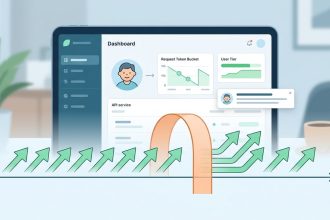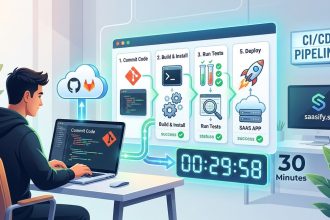
Integrating third-party services into your SaaS platform can feel like navigating a maze. Without a clear strategy, it’s easy to encounter roadblocks like security issues, performance hiccups, or increased complexity. But with the right SaaS integration strategies, you can unlock new functionalities, streamline workflows, and delight your users. Whether you’re adding a payment gateway or connecting with marketing tools, mastering these approaches is essential for scaling effectively.
Implementing thoughtful SaaS integration strategies enables smoother third-party connections, enhances user experience, and drives scalable growth for your platform.
Why SaaS integration strategies matter for your platform
Effective SaaS integration is about more than just connecting apps. It’s about creating a cohesive ecosystem that boosts your product’s value, simplifies maintenance, and accelerates innovation. Well-planned integrations can help you expand functionality without reinventing the wheel, reduce development costs, and prevent technical debt. They also ensure your platform remains flexible and adaptable as your user base and market evolve.
Foundations of successful SaaS integrations
Before diving into specific techniques, it’s vital to understand the core principles that underpin good SaaS integration strategies:
- Security first: Protect user data and ensure compliance with industry standards.
- Scalability: Design integrations that grow with your platform without bottlenecks.
- Maintainability: Keep your integrations easy to update and troubleshoot.
- User experience: Seamless, fast, and reliable integrations keep users happy and engaged.
With these guiding principles, you can craft a strategy that minimizes risks while maximizing benefits.
Practical steps to master SaaS integration strategies
Here are three practical processes to embed into your development workflow:
-
Assess your needs and define clear objectives.
Determine what functionalities or data flows you want to enhance. Are you adding payments, analytics, or communication tools? Clarify the goals to align your integration approach accordingly. -
Choose the right approach for each use case.
Not all integrations are created equal. Some require deep, native connections, while others can be handled with middleware. Select techniques based on complexity, security needs, and future scalability. -
Implement, test, and iterate continuously.
Integration isn’t a one-time task. Set up monitoring to catch issues early, gather user feedback, and refine your connections over time.
Techniques for integrating third-party services
Different scenarios call for different methods. Here’s a breakdown of popular techniques:
| Technique | Description | Common Mistakes | Best Practices |
|---|---|---|---|
| Native integrations | Built-in API connections directly embedded into your platform | Overcomplicating with unnecessary features | Keep integrations lightweight and purpose-driven |
| iPaaS (Integration Platform as a Service) | Cloud-based connectors that streamline multiple apps | Relying solely on middleware for critical functions | Use iPaaS for rapid prototyping, not core services |
| RPA (Robotic Process Automation) | Automating repetitive tasks with bots | Creating brittle automation scripts | Regularly review and update RPA workflows |
| Custom API integrations | Developing tailored connectors for unique needs | Poor documentation leading to confusion | Document thoroughly and standardize API calls |
Techniques and mistakes table
| Technique | Mistakes to avoid | Tips for success |
| --- | --- | --- |
| Native API integration | Ignoring security protocols | Use OAuth and encrypt data |
| iPaaS | Overdependence on middleware | Balance middleware with direct API calls |
| RPA | Building fragile scripts | Automate only stable, repetitive tasks |
| Custom integrations | Lack of documentation | Maintain clear, versioned docs |
Best practices for SaaS integration strategies
Here are some proven practices to ensure your integrations are robust and scalable:
- Prioritize security. Always authenticate with OAuth or API keys, encrypt sensitive data, and stay compliant with standards like GDPR or PCI DSS.
- Document everything. Maintain clear records of API endpoints, data schemas, and integration workflows.
- Test thoroughly. Set up automated tests and monitor real-time performance to catch issues early.
- Plan for failure. Implement fallback mechanisms and alerting to prevent user disruption.
- Iterate and optimize. Use user feedback and monitoring data to refine integrations over time.
“Think of your SaaS integrations as the nervous system of your platform. They should be responsive, secure, and adaptable to keep your SaaS healthy and growing.” — SaaS veteran
Building a SaaS integration strategy in 3 steps
To develop a cohesive plan, follow these steps:
1. Map out your ecosystem
Identify all third-party services your SaaS relies on or could benefit from. This might include payment providers, analytics tools, marketing platforms, or communication apps. Map data flows, triggers, and dependencies.
2. Prioritize integrations based on impact and effort
Focus on integrations that deliver the most value with manageable effort. For example, integrating a payment gateway might be higher priority than adding a less-used analytics tool.
3. Standardize and automate your process
Create templates and workflows for onboarding new integrations. Automate repetitive tasks like API key management and testing to reduce errors and save time.
Common pitfalls in SaaS integrations and how to avoid them
| Mistake | Consequence | How to prevent it |
|---|---|---|
| Overloading your platform with unnecessary integrations | Increased complexity and maintenance | Focus on core integrations that truly add value |
| Ignoring security best practices | Data breaches and compliance issues | Use OAuth, encrypt data, and audit regularly |
| Not documenting or testing | Difficult troubleshooting and technical debt | Maintain detailed docs and automated tests |
| Relying solely on middleware | Latency and reliability issues | Use direct API connections for critical features |
| Skipping monitoring | Undetected failures impacting users | Set up real-time dashboards and alerts |
Final thoughts: making SaaS integrations work for you
Integrating third-party services is an ongoing journey. The key is to keep your strategy clear, your tools aligned with your goals, and your team vigilant about security and performance. As your SaaS grows, revisit your integration approach regularly. Automation, documentation, and a focus on user experience can transform integrations from a headache into a competitive advantage.
By applying these SaaS integration strategies, you’ll be better equipped to build a resilient platform that scales smoothly, delights users, and stays ahead of the curve. Keep experimenting, stay curious, and your SaaS ecosystem will thrive.